Version 1.9.0 of the World-Altering Editor (WAE) has been released.
This is a major update. Due to the large amount of architectural changes in this version, consider this version a beta - most functionality should work, but it's not impossible that a bug or two have slipped through.
MCP Server Support for AI Agents
WAE can now host a MCP (Model Context Protocol) server. This exposes the map editor to AI/LLM agents, allowing AI agents to perform various tasks on the map, including
• modifying terrain
• drawing connected tiles
• using the terrain generator
• placing terrain objects, buildings, vehicles, infantry, aircraft, overlays, waypoints...
• editing existing technos
• erasing objects
• querying WAE's loaded rules data and game engine scripting possibilities
• adding and modifying scripting elements
The MCP server is usable with standard agents like ChatGPT and Claude if you run them on the same computer with WAE. Technically AI agents can even generate entire maps, though at least currently they are more suitable for limited, better defined tasks. Note that WAE does not come with its own AI model - you need to use the MCP server with a third-party AI agent.
I've personally used the MCP server with ChatGPT's desktop application (Codex) and had some useful results. I'll share a few examples below.
Example Prompts
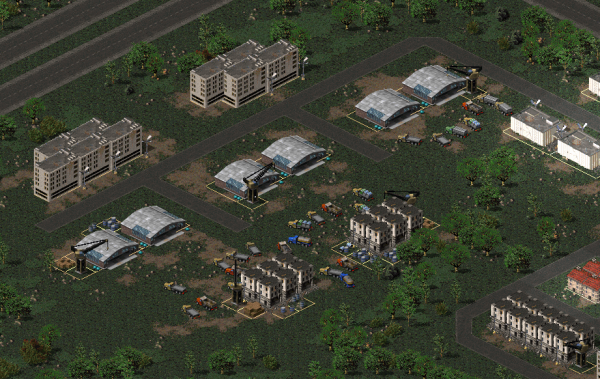
Civilian truck generation:
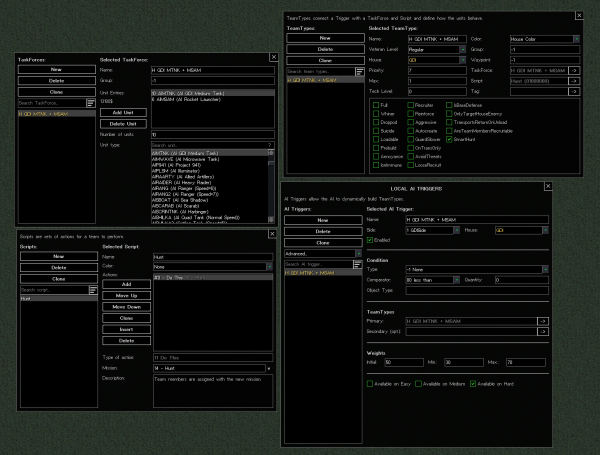
AITrigger scripting:
I've attached images of the results of these two prompts to the end of this message.
The AI also succeeded in performing this task.
Please note that the MCP server feature is experimental and due to its large scale, I've only been able to give it limited testing in relation to its capabilities. If you have any feedback on what the MCP server could do better, please share it.
You can also configure the mapping instructions WAE gives to the MCP server by supplying your own AIMappingInstructions.md file in the Config folder. The default instructions, found in the Default folder, are likely unoptimal for mods that heavily modify stock TS&YR assets.
Connected Tiles Tool Improvements
While the MCP server has taken the bulk of the work for this release, the Connected Tiles tool has also received some attention.
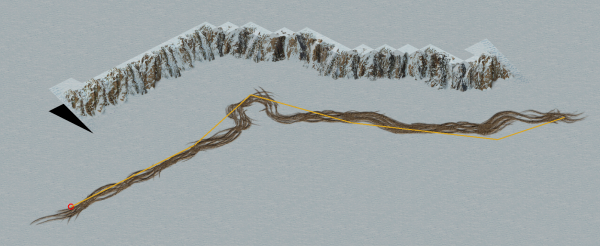
• The Connected Tiles tool can now form closed formations, such as circles.
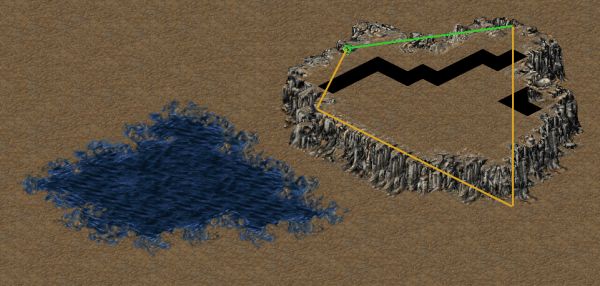
• The Connected Tiles tool can now also create endings for supported connected tile types.
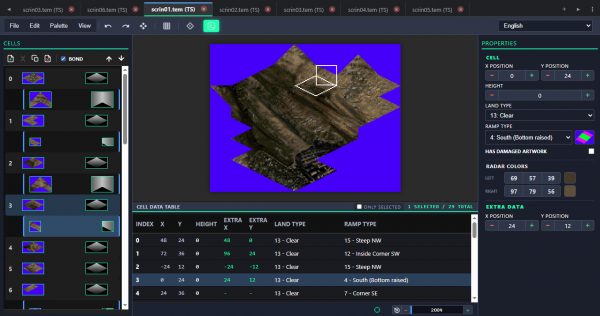
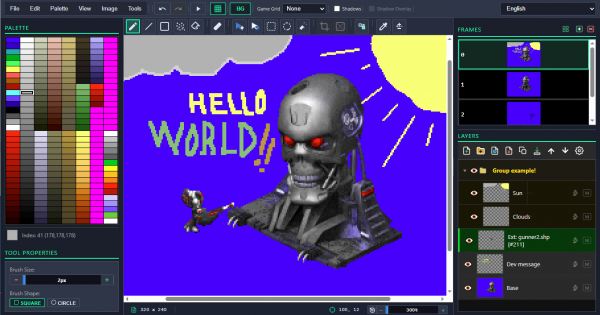
I've attached images of these improvements to the end of the message, too.
Other Changes
• The "Copy Custom Shape" tool now allows clearing the selection by pressing ESC
• The "Flatten Ground" tool now defaults to 3x3 brush size
• Low-level file loading code (MIX, CSF, IsoMapPack5) no longer assumes that the local system is little-endian (like x86/AMD64). Files are now parsed correctly regardless of the endianness of the platform that the code is run on.
• WAE has been split from a monolithic executable to 3 different modules: `MapEditorLibrary.dll`, `MapEditorMCP.dll`, and `WorldAlteringEditor.exe/.dll`. This enforces stricter architecture design and keeps the MCP server as its own component that the rest of WAE is not dependent on.
• Fixed a bug where techno range indicators did not show up when technos were being placed (Credits: NayiemW)
• Fixed a bug where `Edit -> Map Size...` calculated map cell count incorrectly
• Fixed a bug where, after attempting to paint terrain on a non-clear cell with "Only Paint on Clear" enabled, subsequent painting actions on the same cell were ignored even if the "Only Paint on Clear" option was changed
• Fixed a rare (one in 2,600 chance) bug where WAE failed to open a map after it had been saved due to a bug in the LZO decoder
• (DTA) Added terrain object collections for bushes
This is a major update. Due to the large amount of architectural changes in this version, consider this version a beta - most functionality should work, but it's not impossible that a bug or two have slipped through.
MCP Server Support for AI Agents
WAE can now host a MCP (Model Context Protocol) server. This exposes the map editor to AI/LLM agents, allowing AI agents to perform various tasks on the map, including
• modifying terrain
• drawing connected tiles
• using the terrain generator
• placing terrain objects, buildings, vehicles, infantry, aircraft, overlays, waypoints...
• editing existing technos
• erasing objects
• querying WAE's loaded rules data and game engine scripting possibilities
• adding and modifying scripting elements
The MCP server is usable with standard agents like ChatGPT and Claude if you run them on the same computer with WAE. Technically AI agents can even generate entire maps, though at least currently they are more suitable for limited, better defined tasks. Note that WAE does not come with its own AI model - you need to use the MCP server with a third-party AI agent.
I've personally used the MCP server with ChatGPT's desktop application (Codex) and had some useful results. I'll share a few examples below.
Example Prompts
Civilian truck generation:
Quote:
I have the World-Altering Editor running with a map open.
Using the MCP server running at http://127.0.0.1:7743/, could you place a few dozen trucks of various types on the unoccupied cells between (230, 108) and (232, 121)? They should be owned by the "Civilians" house, have Sleep as their mission, and each have random Facing between 176 and 208.
AITrigger scripting:
Quote:
I have the World-Altering Editor running an MCP server at http://127.0.0.1:7743/
Using the MCP server, could you create me an AITrigger and relevant TaskForce/Script/TeamType combination?
Call it "H GDI MTNK + MSAM". It should use the existing "Hunt" script, and contain 10 Medium Tanks (AIMTNK) and 6 Rocket Launchers (AIMSAM).
Using the MCP server, could you create me an AITrigger and relevant TaskForce/Script/TeamType combination?
Call it "H GDI MTNK + MSAM". It should use the existing "Hunt" script, and contain 10 Medium Tanks (AIMTNK) and 6 Rocket Launchers (AIMSAM).
I've attached images of the results of these two prompts to the end of this message.
Quote:
I've created this large urban map with ~1000 civilian buildings. Could you go through the buildings and place 1-3 civilian cars next to each building? Each car should either face the building or be parallel to it. Put each car to "Sleep" mode.
The AI also succeeded in performing this task.
Please note that the MCP server feature is experimental and due to its large scale, I've only been able to give it limited testing in relation to its capabilities. If you have any feedback on what the MCP server could do better, please share it.
You can also configure the mapping instructions WAE gives to the MCP server by supplying your own AIMappingInstructions.md file in the Config folder. The default instructions, found in the Default folder, are likely unoptimal for mods that heavily modify stock TS&YR assets.
Connected Tiles Tool Improvements
While the MCP server has taken the bulk of the work for this release, the Connected Tiles tool has also received some attention.
• The Connected Tiles tool can now form closed formations, such as circles.
• The Connected Tiles tool can now also create endings for supported connected tile types.
I've attached images of these improvements to the end of the message, too.
Other Changes
• The "Copy Custom Shape" tool now allows clearing the selection by pressing ESC
• The "Flatten Ground" tool now defaults to 3x3 brush size
• Low-level file loading code (MIX, CSF, IsoMapPack5) no longer assumes that the local system is little-endian (like x86/AMD64). Files are now parsed correctly regardless of the endianness of the platform that the code is run on.
• WAE has been split from a monolithic executable to 3 different modules: `MapEditorLibrary.dll`, `MapEditorMCP.dll`, and `WorldAlteringEditor.exe/.dll`. This enforces stricter architecture design and keeps the MCP server as its own component that the rest of WAE is not dependent on.
• Fixed a bug where techno range indicators did not show up when technos were being placed (Credits: NayiemW)
• Fixed a bug where `Edit -> Map Size...` calculated map cell count incorrectly
• Fixed a bug where, after attempting to paint terrain on a non-clear cell with "Only Paint on Clear" enabled, subsequent painting actions on the same cell were ignored even if the "Only Paint on Clear" option was changed
• Fixed a rare (one in 2,600 chance) bug where WAE failed to open a map after it had been saved due to a bug in the LZO decoder
• (DTA) Added terrain object collections for bushes
|